If you have a blog with high page views, it only means that your visitors or readers likes your blog, they are more likely spending more time in your blog. Also a high page views also means a high impressions, and if you are running advertisement in your blog such as adsense, you are getting more impressions.
And if you are too worried about your blog bounce rate, then of course increasing page views is one of the many solution you could do.
So here are five (5) tips on how to increase page views
1. Top navigational menu links ( such as home, about us, etc..)- Include a link in your top navigation that lead to what you think the most important part of your blog or you think your visitors would want to read in your blog. This will not just help your visitors to easily navigate in your blog inner pages (when they are on your blog homepage of course), but also your blog visitors that land on your inner pages as well. They can easily navigate your other post or go back to your homepage.
2. Sidebar links- Many bloggers just put lot of unuseful widgets on their sidebars, not only it is not useful but also it also affect the loading time of the blog page. So, why not make your blog sidebar useful.. Like on the #1 tip, find a post in your blog that you think that it is your best post or you think visitors would be interested reading it and make a link to it and put it on your blog sidebar.
3. Expandable post summaries- Many of bloggers are using this on their blogs, It's the read more.., view more.. or continue reading link. This is very effective because you are just showing a snippet of your post, and again if your visitors find your post interesting, they will go for the whole post by clicking your provided link.
4. Linking your post- with each other- When you are writing an article and it is related to your other post, make it a point that you link them. Like for example your sentence is " last time i made a post", then link it to which post you are referring to. This will not only increase your blog page views but also your blog pagerank. yes, you read it right.. because not only our blog homepage are being rank but also the inner pages of our blog. But this post is not about pagerank, it's about how to increase page views, so, I will not make explanation about inner page pagerank to not confuse you.
5. Related post below post- Providing links to a related post to your readers below your actual post, the more likely they will click on it because its related to the post they've just read. Many blogging platforms have widgets or plug-ins that you can set-up in your blog to easily put a related post below the post.
Note: This tips will not only help your visitors to easily navigate your whole blog and increases your page views, but, it will also helps search engine spiders or search engine bots to easily crawl your entire blog for better search engine indexing.
Read more! How To Increase Page Views
Showing posts with label seo. Show all posts
Showing posts with label seo. Show all posts
101 Blogs on Entrecard to Get Backlinks
Sunday, November 09, 2008 / Comments (10) / by kumander / PERMALINK

This list of blogs are blogs that i have found on Entrecard that has a top droppers widgets on their sidebar and some just simply displays their top droppers of the month on their sidebars.
With little effort and consistency of dropping your card, you can easily work your way into the top droppers list and gain backlink from the blogs. The more backlinks you get, as lots of SEO's are saying, the more pagerank (PR) you will get on the next update of google pagerank.
Google ranks search engine results by link popularity, so getting lots of backlinks are important in acheiving a high search engine ranking. Of course quality backlink are much more favorable, but more backlinks also helps.
So here is the list...
List of 101 Blogs with Top Droppers widgets
Feel free to drop your card on them, I know they will appreciate your drops and most likely to reciprocate the drops.
1.http://multiplythemeslayouts.com/
2.http://underscore30.blogspot.com/
3.http://24patrol.blogspot.com/
4.http://nicktay.net/
5.http://texas-sweetie.com/
6.http://picturetopeople.blogspot.com/
7.http://varunsvagaries.blogspot.com/
8.http://shadoweaver.blogspot.com/
9.http://www.mamaflosatx.com/
10.http://beetle-blog.com/
11.http://atniz.com/
12.http://reenashwina.blogspot.com/
13.http://www.beaderjojo.blogspot.com/
14.http://www.babettesblog.com/
15.http://www.socialarrow.com/
16.http://www.jeanjoyce.com/
17.http://www.marmaladeskiesblog.com/
18.http://onthebricks.blogspot.com/
19.http://www.louslens.com/
20.http://snapshotcap.blogspot.com/
21.http://www.nitasrandomthoughts.info/
22.http://www.thebuzznutter.com/
23.http://www.junkfoodaholic.com/
24.http://laketrees.blogspot.com/
25.http://mlizcochico.com/
26.http://parisukat.com/blog/
27.http://ummascorner.blogspot.com/
28.http://www.triz-beadingmania.blogspot.com/
29.http://junodesigns.blogspot.com/
30.http://socalledlife.net/
31.http://www.esoterically.net/weblog/
32.http://pinay-endeavor.com/
33.http://babysetsfire.blogspot.com/
34.http://curiouslyawesome.com/
35.http://isker.biz/blog/
36.http://www.raqmitch.com/
37.http://www.mythoughtsoftrain.blogspot.com/
38.http://isker.biz/blog/
39.http://www.shopaholicnightingale.com/
40.http://www.bobbiedawn.com/
41.http://ladyjava.javaura.com/
42.http://capetownnews.co.za/
43.http://amylilleydesigns.blogspot.com/
44.http://magscrafts.blogspot.com/
45.http://cheapest-airfares-ultimate-discounts.blogspot.com/
46.http://www.moreinternetincome.com/
47.http://poeartica.blogspot.com/
48.http://weezysjournal.blogspot.com/
49.http://mariuca.blogspot.com/
50.http://www.scatalan.com/
51.http://www.glitchline.com/
52.http://www.junkieyard.com/
53.http://maextramoney.com/
54.http://monliam.blogspot.com/
55.http://www.bass-icallyspeaking.com/
56.http://www.texas-sweetie.blogspot.com/
57.http://advertising-for-success.blogspot.com/
58.http://kloggers-randomramblings.blogspot.com/
59.http://blog.texasrvtravel.com/
60.http://agreatpleasure.blogspot.com/
61.http://d-power-of-three.blogspot.com/
62.http://origena.blogspot.com/
63.http://gregorymathews.com/
64.http://michiganrafter.blogspot.com/
65.http://www.jobysblog.com/
66.http://spicybug.blogspot.com/
67.http://www.myimaginarytravels.com/
68.http://turn-u-off.blogspot.com/
69.http://stitchestm.blogspot.com/
70.http://www.ebooktechie.com/
71.http://slowstreamyx.com/
72.http://tokyo-tom.blogspot.com/
73.http://worldwidetravelblog.blogspot.com/
74.http://mixed-reflections.blogspot.com/
75.http://dietpulpit.com/
76.http://www.marienp.com/
77.http://blog.deltapanthera.com/
78.http://indiedesign.typepad.com/modern_glam/
79.http://designsbysheila.blogspot.com/
80.http://ayushcorp
81.http://sexybluemame.blogspot.com/
82.http://www.tchel.com/
83.http://www.spicybugz.com
84.http://chillyscookin.blogspot.com/
85.http://topclanz.net/blog/
86.http://www.lainiesips.com/
87.http://thevirtualdimemuseum.blogspot.com/
88.http://techbypc.com/blog/
89.http://www.brainmenu.com/
90.http://colonjoy.blogspot.com/
91.http://thehousethatkoenclairerebuilt.blogspot.com/
92.http://www.nursestale.com/
93.http://my2cents-weezy.blogspot.com/
94.http://www.colorfulworldofshiela.com/
95.http://smoothiesplace.blogspot.com/
96.http://freemoneysavingtips.blogspot.com/
97.http://usinghumor.com/
98.http://opinionpinoy.blogspot.com/
99.http://mariucasperfume.blogspot.com/
100.http://angelika2.blogspot.com/
101.http://angelika1972.blogspot.com/
How to Link to This Page
To link to this page from your website, simply cut and paste the following code to your web page.
It will appear on your page as:
101 Blogs on Entrecard to Get Backlinks
Read more! 101 Blogs on Entrecard to Get Backlinks
My Blogs PageRank Shows N/A
Tuesday, October 21, 2008 / Comments (4) / by kumander / PERMALINK
Pagerank n/a, whats wrong with my blogs PR? I noticed this morning that two of my blogs pagerank went n/a from PR3 and PR2, but another of my blog still have its PR3.
I checked my blogs stats in google webmaster tools and my blogs are still indexed by google. Links on pages with external links are still in place, meaning my blog still have their backlinks.
Inner pages of my blogs also still has their pagerank.
But the result on pages that link to my fronpage or when ever I search from google search typing link:underscore30.blogspot.com, all I get is Your search - link:underscore30.blogspot.com - did not match any documents. That goes the same with my other blog. What's up with that?
Does this mean my two blogs are being banned by google or penalized? I dont get it.. I dont do paid post, paid reviews or sell text link.
Is this just caused by temporary bugs? I think i'll just wait and see and hope it will not affect my blogs search engine rankings.
UPDATE: Nov. 17 - The blog pagerank is now back :)
Read more! My Blogs PageRank Shows N/A
Search Extension for Firefox and Mozilla
Saturday, August 16, 2008 / Comments (2) / by kumander / PERMALINK
SearchStatus - Display the Google PageRank, Alexa rank and Compete ranking anywhere in your browser, along with fast keyword density analyser, keyword/nofollow highlighting, backward/related links, Alexa info and other SEO tools.
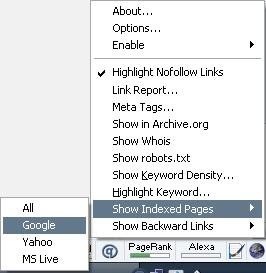
This adds-on will tell you how famous your blog/site is and every blog/site you visit. Simply install it on the lower right of your Firefox browser on statusbar. The status will change according to the current page in your browser. What i like most of this tool feature is the highlighting of nofollow links, it helps recognise efficiently which links is not in Dofollow.
An excerpt from HubSpot on how PageRank is calculated:
If you're just new on using Firefox, you can search lots of useful Firefox extensions available at the Firefox add-ons site, or simply on your firefox browser click tools> click add-ons and a pop-up window for add-ons option opens.
Read more! Search Extension for Firefox and Mozilla

This adds-on will tell you how famous your blog/site is and every blog/site you visit. Simply install it on the lower right of your Firefox browser on statusbar. The status will change according to the current page in your browser. What i like most of this tool feature is the highlighting of nofollow links, it helps recognise efficiently which links is not in Dofollow.
An excerpt from HubSpot on how PageRank is calculated:
0-3: New sites or sites with very minimal links
4-5: Popular sites with a fair amount of inbound links
6: Very popular sites that have hundreds of links, many of them quality links
7-10: Usually media brands (NYTimes.com), big companies or A-list bloggers.
If you're just new on using Firefox, you can search lots of useful Firefox extensions available at the Firefox add-ons site, or simply on your firefox browser click tools> click add-ons and a pop-up window for add-ons option opens.
Read more! Search Extension for Firefox and Mozilla
I Follow
Thursday, July 24, 2008 / Comments (2) / by kumander / PERMALINK
NoFollow is an HTML attribute that can be attached to a hyperlink. When present this tag effectively tells search engines not to allow the link to get any credit when ranking in their index. It typically looks like this ..
< rel="nofollow" href="http://www.w3.org" >
Google announced in 2005 that links using this tag would also not have an influence on the link target’s PageRank - and MSN and Yahoo followed Google’s lead. The intention was to prevent comment spams from being crawled by its search engine.
The NoFollow link attribute (rel=”nofollow”) was originally created to block search engines from following links in blog comments, due to the amount of blog comment spamming. Problem is, spammers still spam.
To show that i appreciate commenters and supports the Do Follow bloggers.. I turn off "nofollow" attribute on this blog
If youre interested in disabling the NoFollow link attribute, check here on how to.. this one for WordPress, this post is for Blogspot and this post if you’re a Moveable Type user
And for some cool “U Comment, I Follow” badges, check out the blog of Randa Clay and http://blog.blogsthatfollow.com/u-comment-i-follow-badges/
UPDATE: this post is also for disabling the NoFollow link attribute for blogger platform.
Read more! I Follow
< rel="nofollow" href="http://www.w3.org" >
Google announced in 2005 that links using this tag would also not have an influence on the link target’s PageRank - and MSN and Yahoo followed Google’s lead. The intention was to prevent comment spams from being crawled by its search engine.
The NoFollow link attribute (rel=”nofollow”) was originally created to block search engines from following links in blog comments, due to the amount of blog comment spamming. Problem is, spammers still spam.
To show that i appreciate commenters and supports the Do Follow bloggers.. I turn off "nofollow" attribute on this blog
- Comments on this blog are made DOFOLLOW for the Google Spiders.
- Comments are moderated.
- Spam will not be tolerated.
If youre interested in disabling the NoFollow link attribute, check here on how to.. this one for WordPress, this post is for Blogspot and this post if you’re a Moveable Type user
And for some cool “U Comment, I Follow” badges, check out the blog of Randa Clay and http://blog.blogsthatfollow.com/u-comment-i-follow-badges/
UPDATE: this post is also for disabling the NoFollow link attribute for blogger platform.
Read more! I Follow


